
Field guide
A private Gmail app for Mac, with no servers in the middle
Many email apps route your mail through their own servers. Postal doesn't: your Gmail goes only between your Mac and Google, and known trackers never load.
When you sign in to an email app with Google, you're giving that app the keys to your mail. Before you do, it's worth asking one question: does my mail go only to my computer, or through the app maker's servers too?
Why it matters
Some email apps keep a copy of your mail, or of your Google sign-in, on their own servers. They do it for good reasons: push notifications, scheduled sends, shared inboxes, AI that runs in the cloud. But every server that holds your mail is one more place it can leak from, one more company that could read it, and one more privacy policy to trust.
How to tell: read the app's privacy policy for the words "our servers" or "processed on." If notifications, AI or Send Later need the company's servers, your mail passes through them.
How Postal handles your mail
Postal is a free Mac app for Gmail, built so we never see your email.
- No servers in the middle. Your Mac talks to Google directly. We don't run a server that holds, reads or forwards your mail.
- You sign in on Google's page. Your password never reaches us, Google shows you exactly what Postal may do, and you can take that access back any time in your Google Account.
- Encrypted on your Mac. Mail, pictures and unsent drafts that Postal keeps for speed are stored encrypted. Security has the details, and the privacy policy lists everything Postal stores or sends.
- Google still holds your mail. Postal changes who else sees it, not where Gmail keeps it.
- AI that stays home. AI search and Smart Compose run on Apple's on-device model, so no email goes to an AI company. Searches go to Google, as any Gmail search does.
- No ads, no selling. We don't sell your data or use it for ads, and Postal is free with no ads in it.
Tracking pictures, blocked
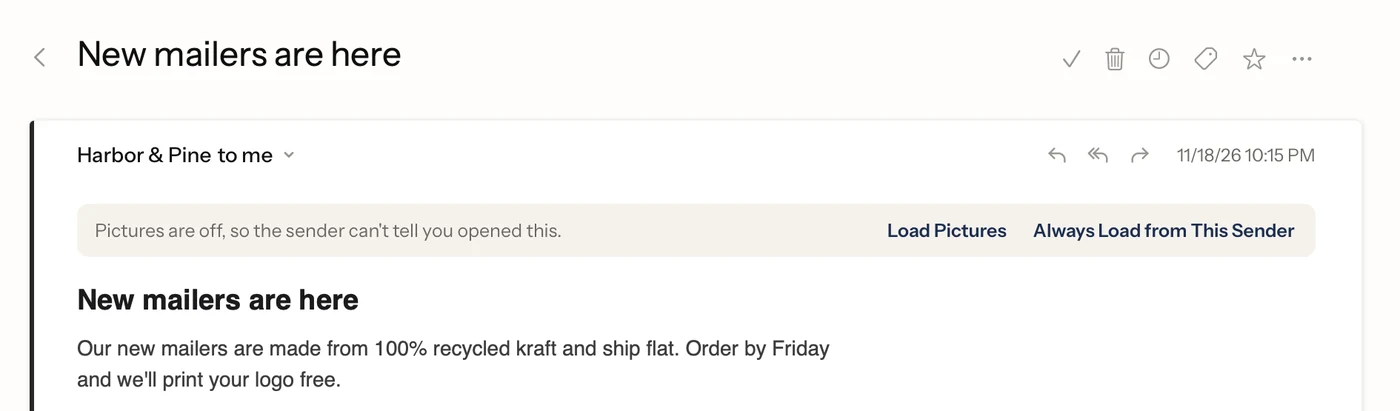
Most marketing email carries a tiny invisible picture. When your email app loads it, the sender learns you opened the email, and when. Gmail on the web loads pictures by default, through Google's own image server: that hides where you are, but the sender may still learn you opened it.
In Postal, known tracking pictures, and pictures too small to see, never load. A sender can still hide a tracker in an ordinary picture, so for more, turn on Ask Before Loading Pictures in Settings, Privacy, and no picture from the web loads until you choose Load Pictures. You can always load them for one email, or for everyone from a sender you trust.
Warnings before you click
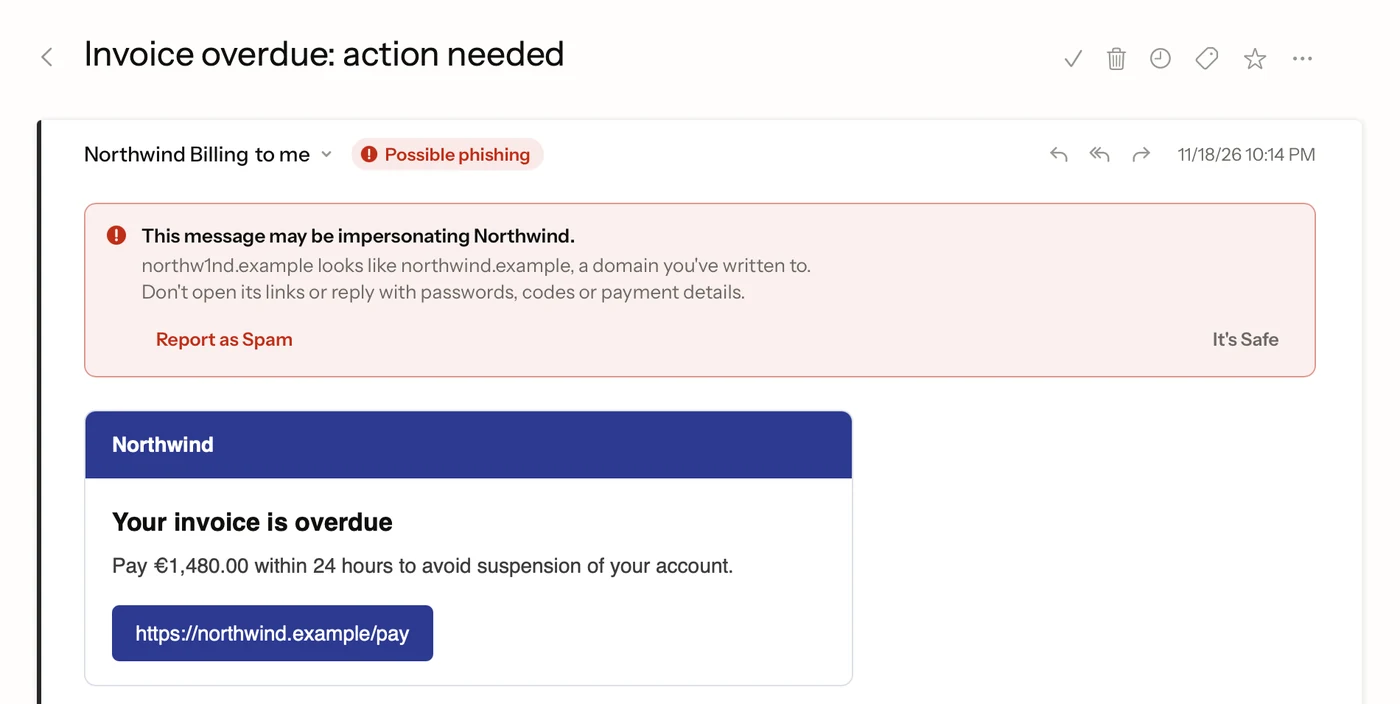
- Phishing warnings. An email pretending to be a company or someone you know gets a red warning at the top, saying who it's imitating.
- Link check. A link whose words say one place but that goes somewhere else asks before it opens.
What to check in any email app
- Does my mail or sign-in pass through the company's servers?
- Where does the AI run: on my device, or in the cloud?
- Does it block tracking pictures, and can it hold back every picture?
- Can I remove its access to my account in one place?
Postal's answers are no, on your Mac, yes, and yes: in your Google Account.
Facts on this page checked . Other apps change; their own sites have the latest.
Join Postal's free waitlist
Leave your email and click the link we send to confirm it. Everyone confirmed by Tuesday at 10 AM Pacific gets an invite that day, and we help each one get set up.
Free · macOS 15 or later · Gmail and Google Workspace. The iPhone app is on TestFlight. How we use your email