
Field guide
AI for Gmail that runs on your Mac, not in the cloud
Postal's AI search and Smart Compose run on Apple's on-device model, so no email goes to an AI company. What they do, what they need, and their limits.
Most AI in email apps works the same way: your email goes up to a cloud model, the answer comes back. It's powerful, and it means a copy of your mail on someone else's computer for a while.
Apple's Macs now carry a capable language model of their own, part of Apple Intelligence. Postal uses it, so the AI in Postal runs on your Mac. No email is sent to an AI company. The one thing that leaves is what any Gmail search sends: the search itself, to Google.
What it does in Postal
Search in plain words
Gmail search is powerful if you know its words, like from: and after:. Most people don't. In Postal, type what you remember instead:
quotes from Dana about the tubes
Postal turns that into the Gmail search that finds it, from:dana@northwind.example quote tube, and shows the results, as in the picture on Gmail search operators. The search it wrote stays on screen, so you can see it and change it.
Smart Compose
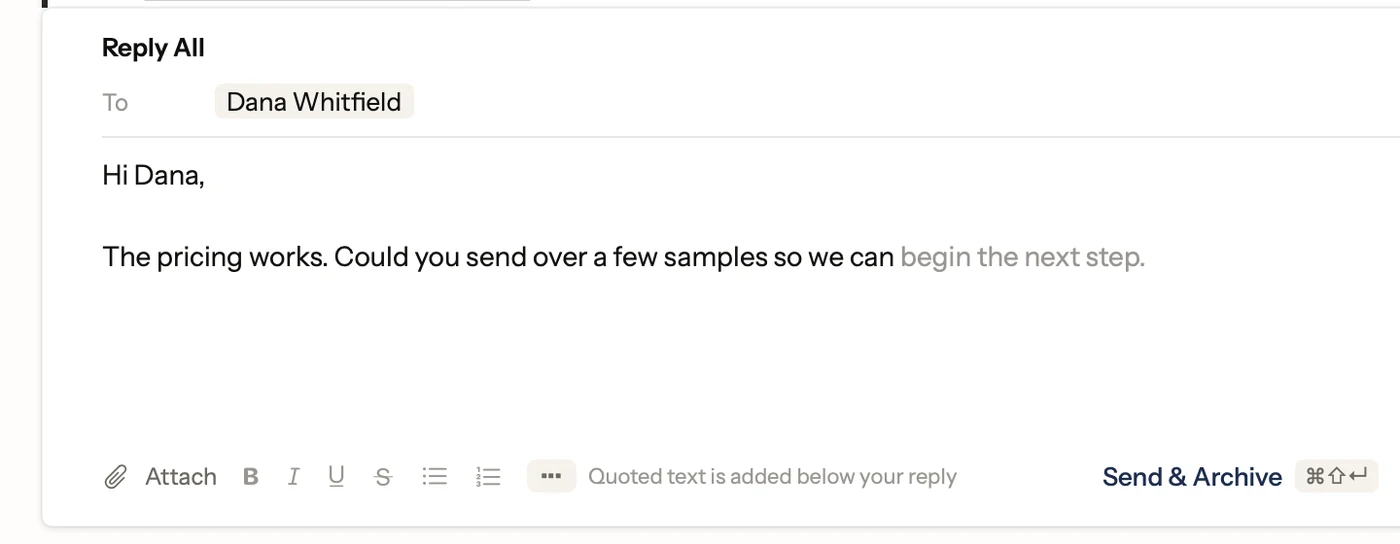
As you type a reply, gray words suggest the rest of the sentence. Press Tab to keep them, or keep typing to ignore them. Postal checks each suggestion and throws out ones that look like they add a name, number, date or address that isn't already in the conversation. Like any AI it can still guess wrong, so read before you press Tab.
What you need
- A Mac with Apple silicon that supports Apple Intelligence.
- macOS 26, with Apple Intelligence turned on in System Settings.
- Postal, which is free.
Everything else in Postal works on macOS 15 or later. On a Mac without Apple Intelligence, search still takes Gmail's search words, and the Advanced Search form fills them in for you.
On-device or cloud?
| On your Mac | Cloud AI | |
|---|---|---|
| Where your email goes | Nowhere new | To the AI company's servers |
| Cost | Free with your Mac | Often a monthly plan |
| Best at | Short, focused jobs like a search or a sentence | Long answers and summaries |
Neither is wrong. Cloud models handle bigger questions. But for the everyday jobs, finding an email and finishing a sentence, the model on your Mac is quick, free and private, and that's what Postal uses.
Turning it on or off
Smart Compose is a switch in Postal's Settings, Writing. If you'd rather not use Apple Intelligence at all, turn it off in System Settings and Postal works as a plain, fast Gmail app.
Facts on this page checked . Other apps change; their own sites have the latest.
Join Postal's free waitlist
Leave your email and click the link we send to confirm it. Everyone confirmed by Tuesday at 10 AM Pacific gets an invite that day, and we help each one get set up.
Free · macOS 15 or later · Gmail and Google Workspace. The iPhone app is on TestFlight. How we use your email