
Field guide
Gmail search operators, and how to search without memorizing them
The Gmail search words that find any email, like from:, has:attachment and after:, with examples. And how to skip them and type a plain sentence instead.
Gmail's search box understands more than words. Add a few short operators and you can find one email in ten years of mail: everything from one person, only emails with a PDF, only last March. They work in Gmail on the web, in Gmail's phone apps, and in apps built on Gmail.
The ones you'll actually use
| Operator | Finds | Example |
|---|---|---|
from: | Mail from a person or company | from:dana@example.com |
to: | Mail addressed to someone | to:tom |
subject: | Words in the subject line | subject:invoice |
has:attachment | Emails with any attachment | from:dana has:attachment |
filename: | An attachment by name or type | filename:pdf |
after: and before: | A date range, as year/month/day | after:2026/03/01 before:2026/04/01 |
newer_than: | Recent mail, in days, months or years | newer_than:7d |
larger: | Emails over a size | larger:10M |
is:unread | Mail you haven't opened | is:unread from:boss |
label: | Mail with a Gmail label | label:clients |
in:anywhere | Spam and Trash too | in:anywhere receipt |
-word | Leave a word out | invoice -draft |
" " | An exact phrase | "purchase order" |
OR | Either word | from:dana OR from:tom |
Operators stack. from:tom invoice after:2026/09/01 before:2026/10/01 has:attachment finds Tom's invoices from September that came with a file.
Gmail's search form
If typing operators feels like programming, Gmail has a form for them. Click the sliders icon at the right end of Gmail's search box and fill in From, To, Subject, Has the words, Size and Date within. Gmail writes the operators for you.
Search tips that save time
- Search the sender's domain.
from:@example.comfinds everyone at one company. - Start broad, then narrow. Search a name first, then add
has:attachmentor a date once you see too many. - Find big emails to free space.
larger:10Mlists the heavy ones, so you know what to delete. - Find what you sent.
in:sent to:danais every email you've written to Dana.
Searching in Postal
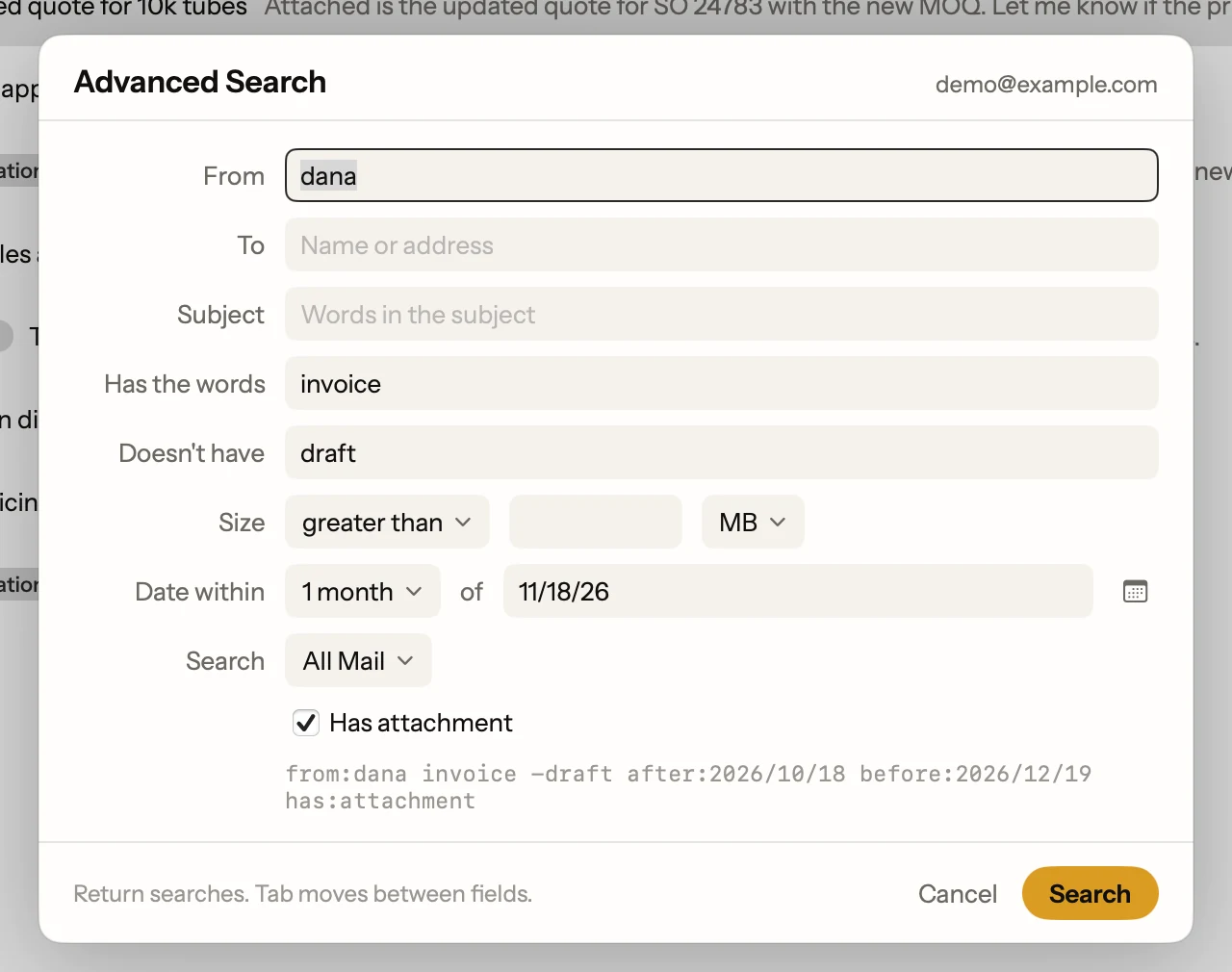
Postal, a free Mac app for Gmail, speaks the same operators. Press / and type them as you would in Gmail.
Press / twice and Postal opens its Advanced Search form: From, To, Subject, Has the words, Doesn't have, Size, Date within and more. As you fill it in, the Gmail search it builds shows underneath, so you learn the operators as you go.
Or just say it (more on AI search)
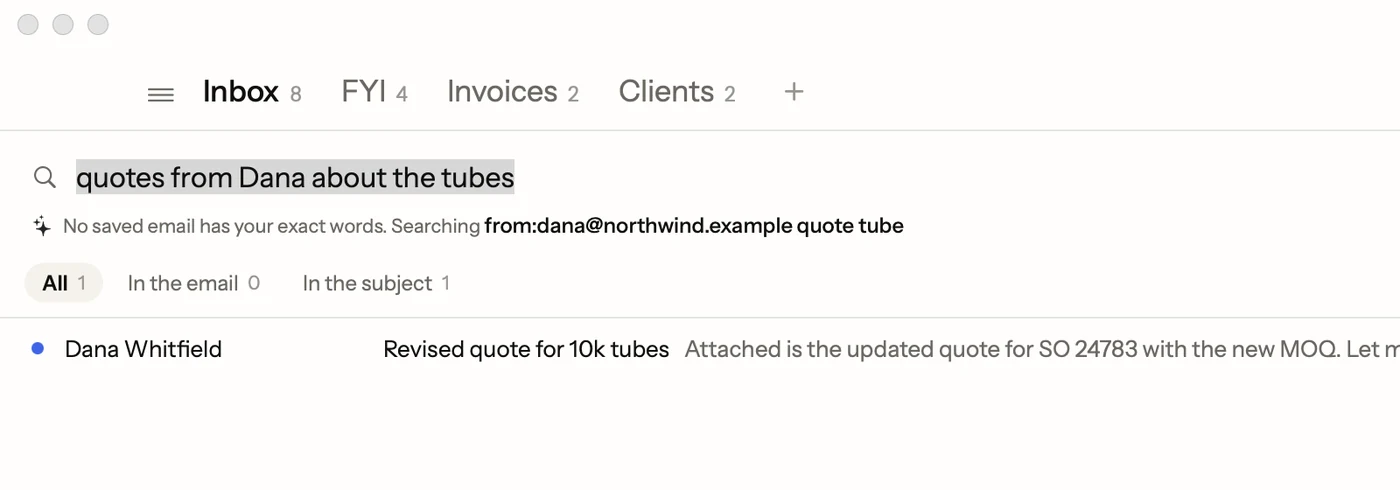
With AI search on, you don't need operators at all. Type what you remember:
invoices from Tom in September
Postal turns it into from:tom@example.com invoice after:2026/09/01 before:2026/10/01 and searches. The search it wrote shows on screen, so you can check it or change it. AI search runs on your Mac with Apple's on-device model, and needs macOS 26 with Apple Intelligence turned on.
Facts on this page checked . Other apps change; their own sites have the latest.
Join Postal's free waitlist
Leave your email and click the link we send to confirm it. Everyone confirmed by Tuesday at 10 AM Pacific gets an invite that day, and we help each one get set up.
Free · macOS 15 or later · Gmail and Google Workspace. The iPhone app is on TestFlight. How we use your email