
Field guide
Custom inbox tabs in Gmail: the limits, and a way around them
Gmail's five inbox tabs are fixed and you can't add your own. Here's what Gmail does offer, and a free Mac app that turns any Gmail label into a tab.
Gmail's inbox tabs, Primary, Promotions, Social, Updates and Forums, sort your mail for you. They're also all you get. Google's help page is plain about it: you can only choose from those categories, and you can't create your own.
So if you want an Invoices tab, or one tab per client, Gmail alone won't do it. Here's what you can do instead.
What Gmail offers
Pick which of its tabs you see
In Gmail on the web, click the gear, then See all settings, then Inbox. Under Categories, check the tabs you want. Anything unchecked falls back into Primary.
Move mail between tabs
Drag an email onto another tab and Gmail asks whether to do the same for that sender from now on.
Labels and Multiple Inboxes
Labels are Gmail's real way to sort. A filter can label mail as it arrives, from a person, a domain, or with a word in the subject. Gmail's Multiple Inboxes can then show those labels as sections stacked on your inbox page. To try it: in Settings, open Inbox, set Inbox type to Multiple Inboxes, type a search like label:invoices into the first section, and click Save Changes. It's useful, but the sections share one long page; they aren't tabs you switch between. Gmail search operators helps with the searches.
Real tabs from your labels, in Postal
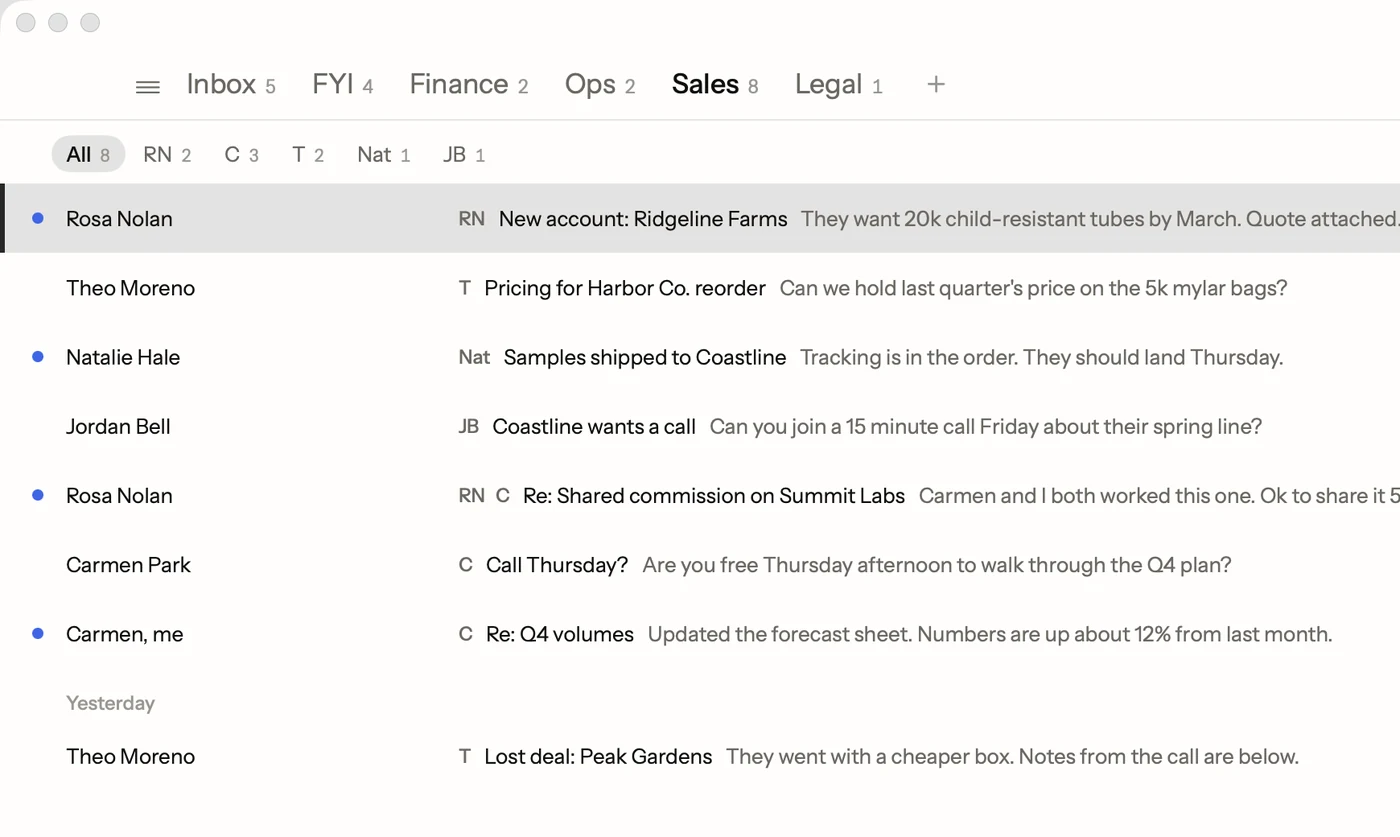
Postal is a free Mac app for Gmail where the tabs across the top of your inbox are yours to choose.
- Any label becomes a tab. Pick a Gmail label, like Invoices or a client's name, and it gets a tab. Mail with that label lands there.
- Group several under one. Put your sales team's labels under one Sales tab, with a sub-tab for each person. [ and ] move between them.
- Keep Gmail's tabs if you like them. Add Promotions, Social, Updates or Forums as tabs of their own.
- FYI for the rest. Alerts, receipts and newsletters gather in FYI, apart from the mail that needs an answer.
- Move with the keyboard. Tab goes to the next tab and ⇧Tab to the one before. A + after your tabs makes a new one.
Because the tabs come from Gmail labels, nothing about your Gmail changes. Gmail on the web and on your phone still shows the same labels. Postal just shows them the way you'd sort them yourself.
A starting setup that works
- Inbox for people writing to you.
- FYI for everything you only need to read.
- One tab for your biggest kind of work mail, like Invoices, Orders or a key client.
- A group for people, if you manage a team, with a sub-tab each.
Start with three or four. You can add a tab the day a pile of mail asks for one.
Facts on this page checked . Other apps change; their own sites have the latest.
Join Postal's free waitlist
Leave your email and click the link we send to confirm it. Everyone confirmed by Tuesday at 10 AM Pacific gets an invite that day, and we help each one get set up.
Free · macOS 15 or later · Gmail and Google Workspace. The iPhone app is on TestFlight. How we use your email